01
Save
Save words and sentences that catch your interest during learning to your notes.
SPACED REPETITION REVIEW
DORS.AI's Spaced Repetition Review is a feature for revisiting words and sentences saved to your notes at their next review time. Review results are used to update keyword, pronunciation, and translation mastery states and set the next review time.
Unreviewed content and content still being learned is repeatedly checked, and mastered content is revisited with spaced intervals.
WHAT ENTERS REVIEW
Words and sentences saved during learning, and notes you create yourself, become review targets. It's a note review for revisiting saved content later.
01
Save words and sentences that catch your interest during learning to your notes.
02
When the review date arrives, it becomes a current review candidate. Unreviewed content and content without a next date can also be candidates.
03
A single review session's results are applied together, updating each dimension's mastery state and the next review time.
THREE DIMENSIONS
Rather than judging whether you memorized a word or sentence all at once, you check keyword, pronunciation, and translation separately. When all three dimensions reach mastery, the entire note is mastered.
KEYWORD
If this round's accuracy is 80% or above, it passes. When passes reach 2 consecutive times, this dimension reaches mastery.
PRONUNCIATION
If the pronunciation score is 80 or above, it's excellent. When excellent reaches 2 cumulative times, this dimension reaches mastery.
TRANSLATION
If this round's answer is correct, it passes. When correct answers reach 2 consecutive times, this dimension reaches mastery.
Overall state: When all three dimensions reach mastery, the entire note is mastered.
REVIEW STATES
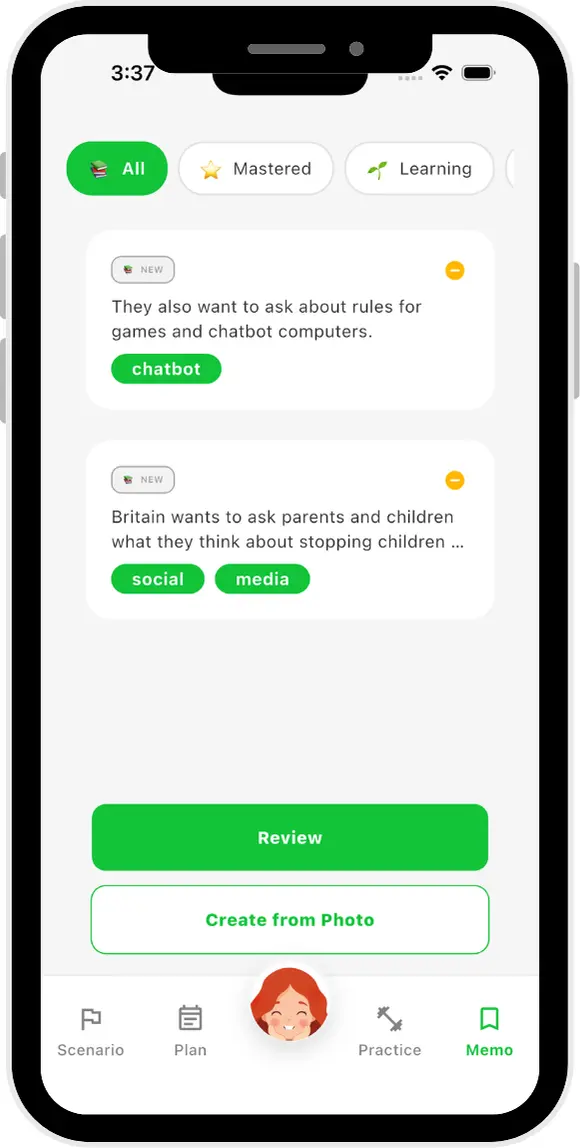
On the memo screen, you can check All / Mastered / Learning filters, NEW / LEARNING states, and a "Time to review" indicator. Review results are used to record the mastery state of the three dimensions and set the next review time.
NEW
Content not yet reviewed.
LEARNING
Content with dimensions not yet mastered.
MASTERED
Content where all three dimensions have reached mastery.
CURRENT INTERVAL RULES
The current note review sets the next interval based on the state of mastered dimensions and dimensions still being learned. This is a description of current product rules and does not guarantee memory or learning effectiveness.
MASTERED
STILL LEARNING
If there are dimensions not yet mastered, the next review is set based on the shortest interval among the three dimensions, usually at minimum 1 day later.
The review date is not a fixed effectiveness prediction, but a next-time guideline based on current review state.
TODAY'S REVIEW
The current note review selects up to 5 items per session. It checks whether the review date has arrived in the user's timezone, and targets unreviewed notes, notes that reached their review date, or notes without a next date.
Review targets that are still being learned and have unmastered dimensions are prioritized. Other targets are selected based on note state, review date, and other factors.
Review results from one session are applied together, updating states and next review times.
VISIBLE PROGRESS
Review results, mastery states, previous and next review dates are recorded by the system to track review progress and determine the next schedule. What you can see on screen is described based on the memo screen display.
All / Mastered / Learning filters, NEW / LEARNING states, and a "Time to review" indicator are visible.
Results such as keyword accuracy and pronunciation scores are used to update mastery states and next schedule.
Based on review state and results, the next review date is set.
PLATFORMS AND ACCESS
Note review is available to logged-in users. iOS, Android, and Web features are currently shared, and your account and learning data sync across devices.
Note review has no additional VIP requirements. Free users can save up to 10 notes. Trial and Paid users are not subject to the Free 10-note limit. For the latest conditions, see Pricing.
The Japanese Chrome Extension lets you save web page keywords and sentences to your notes for later review. However, the Chrome Extension itself is not a complete entry point for review.
WHO IT IS FOR
LEARNING SUPPORT, NOT A GUARANTEE
Mastery states and review intervals are not exam scores or formal proof of language ability. They do not guarantee memory or learning effectiveness. Use them as aids for learning tailored to your goals.
For data handling, see the Privacy Policy.
FAQ
NEXT STEP
Check the usage conditions for note review and open the DORS.AI web app.