Beginner
A version for when you want to start with easier-to-follow expressions.
ENGLISH NEWS LEARNING
A feature that turns English news into level-based reading, listening, and comprehension practice.
Each news article comes with three learning versions — beginner, intermediate, and advanced — so you can read, listen, and check your understanding in a structured flow.
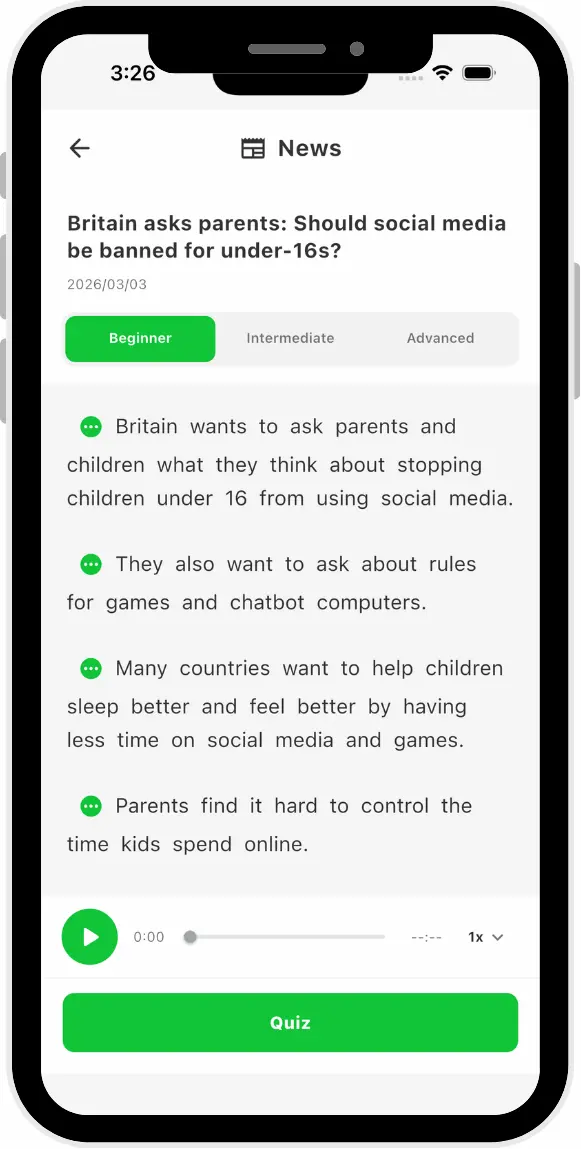
ONE NEWS, THREE WAYS TO READ
DORS.AI prepares daily English news as learning material, providing beginner, intermediate, and advanced versions of the same article. Each version's text and comprehension questions are ready before being shown to users.
A version for when you want to start with easier-to-follow expressions.
A choice when you want to balance readability with a wider range of expressions.
An option for when you want to read news with a broader range of English expressions.
Beginner, intermediate, and advanced are learning-level categories within DORS.AI for reading news. They are not a standardized proof of English proficiency or a substitute for exam results.
A PRACTICAL LEARNING FLOW
News learning doesn't stop at reading the article. You check explanations, listen to audio, and use your comprehension quiz results to guide your next review.
Read the news article in your chosen version.
View word and sentence explanations, and save items of interest to your notes.
Play the audio for that version, with adjustable playback speed.
Answer multiple-choice reading comprehension questions to check your understanding.
Your answer count and results by difficulty are recorded as learning progress.
AUDIO
You can play the article audio for each level — beginner, intermediate, and advanced. If pre-generated audio is available, it is used, and you can adjust the playback speed.
Audio is a feature to support your reading practice. Listenability depends on the text, speed, and your surrounding environment.
COMPREHENSION CHECK
Each version includes 5 multiple-choice questions. After submitting answers, you can see correct and incorrect results. If you answer the same question again, that question's answer is updated.
Questions are a comprehension check for learning — not an exam or official assessment.
WHO IT IS FOR
NOT A MATCH
If you are looking for a news source, a fact-checking service, or an exam substitute, this feature is not suitable. For important facts, please verify with reliable primary sources and the original news outlet.
To learn about the full scope of learning features beyond reading, see What is DORS.
ACCURACY AND SCOPE
The learning versions and comprehension questions for English news are prepared with AI for learning purposes. As a result, content may not be fully accurate, and details from the original news may be omitted. For important facts, please verify with reliable primary sources and the original news outlet.
News articles are shown to users only after all three versions and their comprehension questions are ready.
News learning is for reading, listening, and comprehension practice. It is not a substitute for a news source or fact-checking.
Answer counts and correct/incorrect results are used for progress display, but do not guarantee accurate proficiency measurement or learning outcomes.
PLATFORMS AND MEMBERSHIP
News learning is available on iOS, Android, and Web, with the same current feature set across all three platforms. Use one account, and your learning data syncs across devices.
The Chrome Extension is not the same entry point as this news learning feature. For the latest information on usage conditions, see Pricing.
Under current rules, Free, Trial, and Paid logged-in users can use the news feature. There is no individual Free usage limit for news in the current public Member Perks. Conditions may change, so please check the pricing page before use.
Data processing and learning record handling are described in the Privacy Policy.
FAQ
NEXT STEP
Check the usage conditions for English News Learning and open the DORS.AI web app.