Write a diary entry
Write your diary in English and optionally attach an image.
ENGLISH DIARY CORRECTION
DORS.AI's English Diary lets you save diary entries written in English and request AI correction when you need it.
Correction is not automatic when you save — you need to start the correction action yourself. What you get back is not a full rewrite, but item-by-item grammar and vocabulary suggestions.
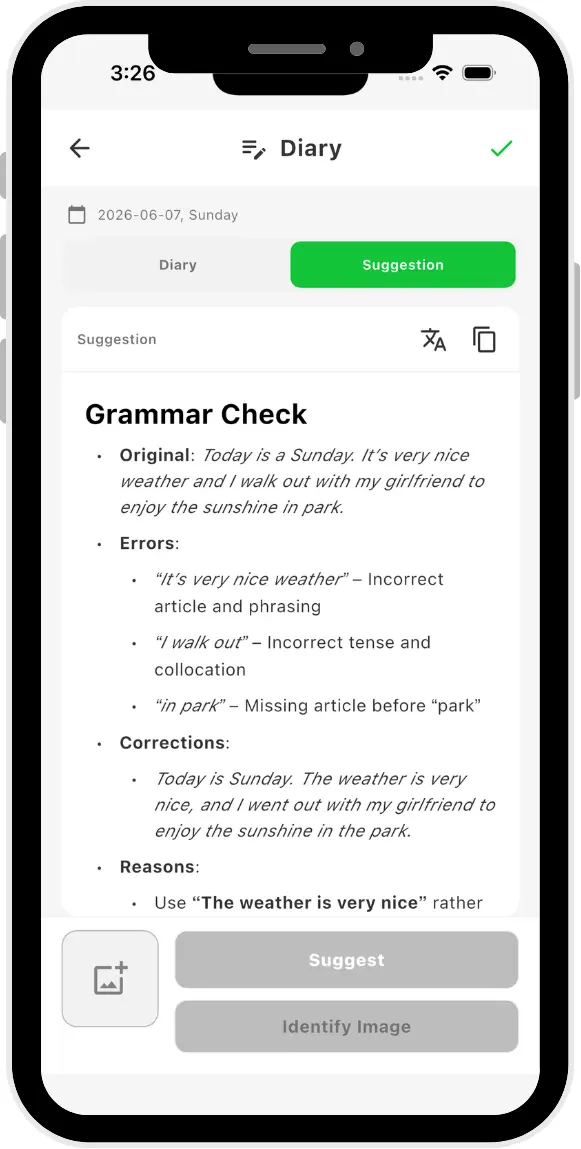
HOW IT WORKS
English Diary is a standalone feature for managing your own writing and checking suggestions at your own timing.
Write your diary in English and optionally attach an image.
Logged-in users can save, edit, view, and delete diary entries.
After saving, you manually request AI correction. Saving alone does not trigger correction.
Compare your diary text with suggestions, check reasons and explanations, and decide for yourself.
WHAT YOU RECEIVE
AI correction does not replace your entire diary with a different text. It identifies relevant parts of your text and shows suggestions in the following format.
GRAMMAR CHECK
For each relevant grammar item, you can check the following fields.
VOCABULARY DIVERSITY
For vocabulary choices, items where you can consider alternative expressions are shown.
Suggestions are learning aids. Please check whether they fit your context and intended meaning before using them.
REVIEW THE RESULT
Correction suggestions can be translated into your language for easier review. If you generate corrections again, the new results replace the previous suggestions.
If you regenerate the translation, the new translation replaces the previous one. Previous results are not kept alongside new ones.
Grammar Check and Vocabulary Diversity suggestions can be viewed in a language that is easier for you to read.
If you want to review the content again, you can regenerate. The new correction results replace the previous ones.
IMAGE RECOGNITION IS SEPARATE
From images attached to your diary, you can extract English nouns, verbs, and adjectives and check word details. This may include phonetic symbols, audio, and meanings.
Image recognition is a standalone feature. Image content does not automatically feed into the Grammar Check or Vocabulary Diversity of your diary text.
WHAT IT DOES NOT DO
To avoid misunderstanding the scope, the following are not promised.
It does not rewrite your entire diary into a single polished text.
It does not automatically accept suggestions or apply all corrections at once.
Diary content and correction results do not automatically feed into your learning plan, Memo, review, or other practice features.
DATA AND PRIVACY
To provide this feature, your diary text, correction suggestions, and image addresses may be processed by configured AI services. For details, see the Privacy Policy.
Deleting a diary removes the diary record, correction and translation results, and any attached saved images.
AI suggestions may not always be fully accurate. This feature does not guarantee specific learning outcomes, so please review important texts yourself.
PLATFORMS AND MEMBERSHIP
English Diary and correction are available on iOS, Android, and Web. The current feature set is shared across all three platforms, and your account and learning data sync across them. The Chrome Extension does not include the diary feature.
Currently, Free, Trial, and Paid logged-in users can use diary and correction. Under current public rules, there is no individual Free usage limit for diary and correction. For the latest usage conditions, see Pricing.
FAQ
NEXT STEP
Before trying diary and AI correction, you can also check pricing, platforms, and privacy handling.